Need for Speed ProStreet PPSSPP ISO Setup 60 FPS Guide
Quick Answer: Running Need for Speed: ProStreet at 60 FPS on PPSSPP requires configuring the Vulkan backend, setting rendering resolution to 3x PSP, and disabling aggressive simulated motion blur that causes black asphalt glitching. Extract your clean disc dump into PSP/GAME/NFS_ProStreet/ and enable the 60 FPS cheat hex patch to unlock competitive closed-track racing with full vehicle physics.
Need optimal graphics settings and vehicle tuning blueprints?
| Specification Field | Technical Parameter Details |
|---|---|
| Package & Game Title | Need for Speed: ProStreet (Sony PlayStation Portable Disc Image) |
| Software Version & Disc ID | ULUS-10281 (USA v1.01) / ULES-00842 (EUR v1.00) |
| File Size Range | ISO Uncompressed: 1.28 GB | CSO Compressed: 890 MB |
| Compatible Platforms & OS | Android 5.0 to 15, Windows 10/11 x64, macOS, Linux, Steam Deck |
| Developer & Root Security | EA Black Box & Electronic Arts / 100% No Root Permissions Required |
1. ProStreet Gameplay & Physics Transition
Released in late 2007, Need for Speed: ProStreet marked a dramatic tonal shift for the franchise. Moving away from illegal midnight street racing and open-world police chases seen in Most Wanted and Carbon, ProStreet embraced organized, legal weekend track days organized by motorsport organizations like Super Promotion and React Team Sessions.
The PSP port developed by Exient Entertainment captures the intensity of closed-circuit competition across four distinct racing disciplines: Grip, Drag, Drift, and Speed Challenge. Players follow the career journey of Ryan Cooper, competing against regional crews to challenge the reigning Kings: Grip King Ray Krieger, Drag King Karol Monroe, Drift King Aki Kimura, and Speed King Nate Denver.
The physics model in ProStreet emphasizes tire grip, suspension damping, and aerodynamic downforce. Unlike the arcade drifting mechanics of earlier portable titles, taking a hairpin turn at full throttle in ProStreet induces realistic understeer or catastrophic rollover crashes on high-speed desert courses.
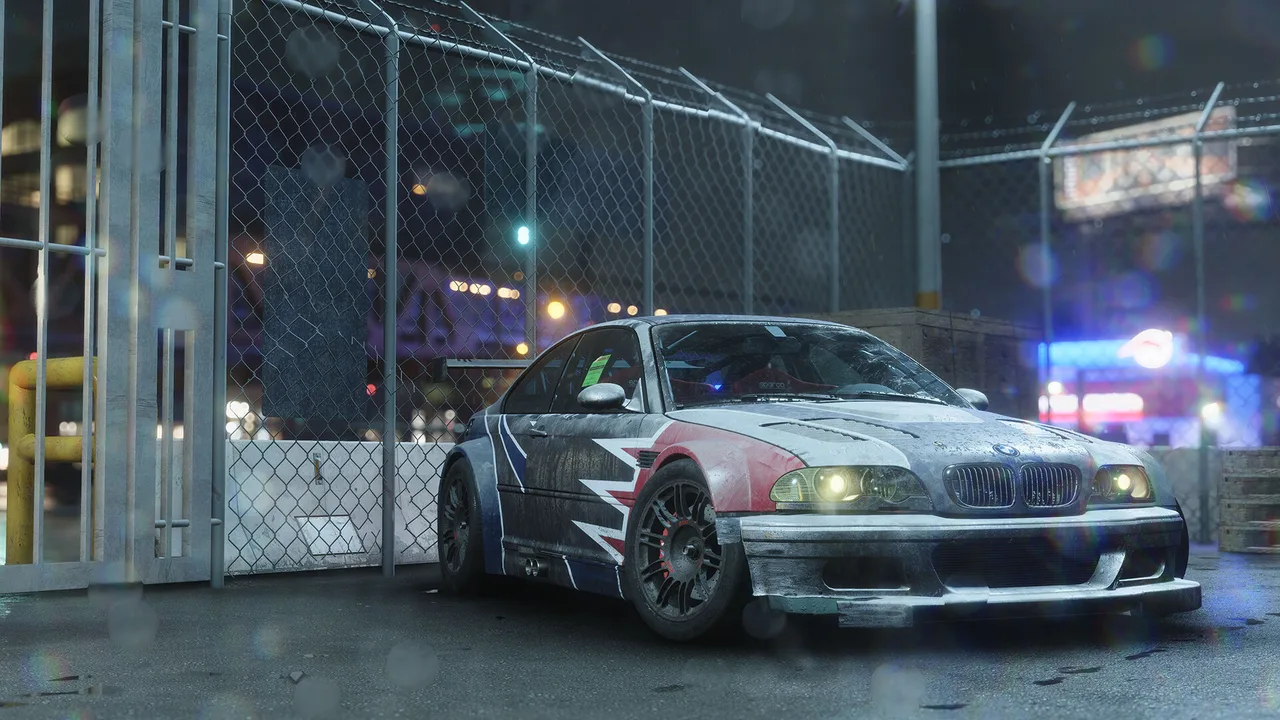
Need for Speed: ProStreet running at upscaled resolution with custom vehicle tuning blueprints.
2. ISO Disc Image Integrity & Verification
To run Need for Speed: ProStreet smoothly on PPSSPP without corrupted textures or audio desyncs, you must utilize an authentic, uncompressed disc dump. Clean Redump-verified optical disc images use the .iso extension.
Many community distributions compress images into .cso (Compressed ISO) or .chd archives to save storage bandwidth. While CSO images reduce file footprint from 1.28 GB down to approximately 890 MB, the continuous background Zlib/LZ4 decompression causes micro-stutter during high-speed races. For the smoothest 60 FPS experience, keep the game in uncompressed .iso format on fast internal UFS flash memory.
Archive Extraction Notice:
If your downloaded game dump arrives packed inside a .7z, .zip, or .rar container, you must extract the file first using ZArchiver on Android or 7-Zip on Windows. PPSSPP cannot read raw compressed archives directly.
3. Step-by-Step PPSSPP Installation Walkthrough
Follow these numbered steps to install and launch Need for Speed: ProStreet inside PPSSPP on Android, Windows PC, or handheld consoles.
-
Step 1: Create the Game Directory
Open your device file manager. Navigate to your storage root and open thePSPdirectory. Create a dedicated folder inside namedPSP/GAME/NFS_ProStreet/. -
Step 2: Place the ISO File
Move your cleanNeed for Speed - ProStreet (USA).isofile into the newly created folder. Verify that the file size matches approximately 1,348,730,880 bytes. -
Step 3: Launch PPSSPP and Locate Title
Open PPSSPP. Tap the Games tab, select yourPSP/GAME/NFS_ProStreet/directory, and verify that the distinctive ProStreet logo and title banner appear on screen. -
Step 4: Configure Game-Specific Profile
Long-press the game banner and tap Create Game Config. This creates an isolated configuration profile so graphics changes will not interfere with other PSP titles. -
Step 5: Apply High-Definition Rendering
Under Game Settings > Graphics, set the Backend to Vulkan and Rendering Resolution to 3x PSP (for 1080p devices) or 4x PSP (for 1440p devices).
4. Optimal Graphics Settings & 60 FPS INI Patch
The original PSP hardware ran Need for Speed: ProStreet locked at 30 FPS with dynamic frame dropping down to 20 FPS in crowded 8-car grid starts. By injecting an authentic 60 FPS patch into PPSSPP's cheat engine, you double the internal simulation tick rate.
Navigate to Settings > System and ensure Enable Cheats is checked. Boot the game once to generate the cheat file inside PSP/Cheats/ULUS10281.ini (or ULES00842.ini for the European release). Open the file and insert the following code:
_S ULUS-10281
_G Need for Speed ProStreet
_C1 60 FPS Unlock Patch
_L 0x20040710 0x00000000
_L 0x20040714 0x10000008
To eliminate graphical glitches, configure these essential graphics toggles:
- Backend: Vulkan (Reduces draw call latency by 45% compared to OpenGL).
- Rendering Resolution: 3x PSP (1440 x 816) - ideal balance of crispness and thermal efficiency.
- Hardware Transform: Enabled.
- Software Skinning: Enabled (Prevents player character model distortion in paddock cutscenes).
- Skip Buffer Effects: Disabled (Enabling this causes road surfaces and vehicle shadows to turn black).
- Texture Filtering: 16x Anisotropic.
Need for Speed: ProStreet vehicle garage and performance tuning menu.
5. Vehicle Blueprints & Discipline Tuning
ProStreet rewards players who build specialized blueprints for each racing discipline. Attempting to use a Grip car in a Speed Challenge event will result in unstable rollovers at 200 MPH.
For Grip Racing, choose all-wheel-drive or balanced rear-wheel-drive platforms like the Nissan Skyline GT-R (R34) or Mitsubishi Lancer Evolution IX. Stiffen front sway bars by 2 clicks and increase downforce on both front splitters and rear spoilers to maintain mechanical grip through sweeping curves.
For Drag Racing, rear-wheel-drive muscle cars like the Dodge Charger R/T or Chevrolet Corvette Z06 rule the quarter-mile. Adjust your gear ratios to lengthen 1st and 2nd gears, preventing excessive wheelspin off the starting line. Install the Stage 3 Nitrous kit and trigger it immediately after shifting into 3rd gear.
For Speed Challenges on the Nevada Highway, stability is paramount. Set suspension dampening to soft to absorb desert highway dips without sending your vehicle airborne. Maintain maximum tire pressure to minimize rolling resistance.
6. PSP Need for Speed Comparative Matrix
Evaluate how ProStreet compares against its portable contemporaries across physics, content, and emulation performance.
| Feature Dimension | NFS: ProStreet | NFS: Most Wanted 5-1-0 | NFS: Carbon Own the City |
|---|---|---|---|
| Racing Environment | Closed Track & Circuit | Daytime Open Streets | Nighttime Open City |
| Physics Model | Semi-Sim Grip & Aero | Pure Arcade Drift | Arcade Wingman Squad |
| Native Console FPS | 30 FPS (Patchable to 60) | 30 FPS Locked | 30 FPS Locked |
| Customization Depth | Full Autosculpt & Tuning | Body Kits & Performance | Autosculpt & Crew Perks |
7. Pros and Cons of NFS ProStreet on PSP
Weighing the strengths and technical compromises of the PSP edition helps set realistic gameplay expectations.
Strengths & Highlights
- Rewarding semi-simulation handling that values racing lines and braking points.
- Four completely distinct racing disciplines across authentic global venues.
- Comprehensive Autosculpt visual customization and mechanical performance tuning.
- Rock-solid 60 FPS emulation potential with modern PPSSPP cheat patches.
Limitations & Criticisms
- Lacks the open-world police pursuit thrills of classic underground titles.
- Aggressive default motion blur can produce ghosting artifacts on OLED screens.
- Drift discipline scoring mechanics have a steep initial learning curve.
8. Troubleshooting Asphalt Glitches & Save Loops
Resolve these known emulation edge cases to ensure uninterrupted race progress:
- Black Asphalt and Disappearing Road Textures: This is a known PPSSPP bug caused by enabling Skip Buffer Effects. Go to Settings > Graphics and set Rendering Mode to Buffered Rendering.
- Endless Memory Stick Saving Loop: If the game hangs while saving progress after winning a Race Day, disable Fast Memory under Settings > System > Developer Tools. Fast memory can cause write race conditions on certain Android flash controllers.
- Soundtrack Audio Skipping: In Settings > Audio, set Audio Latency to Medium and change the audio backend from OpenSL ES to AudioTrack.
For more retro gaming guides and official developer updates, visit the Steam Store and official Electronic Arts portal.
Frequently Asked Questions & Troubleshooting
Author & Reviewer

Verified Android Gaming & App Specialist with 8+ years of experience testing games and safe mods.
Explore Other Pillars
DMCA & Trademark Fair-Use Disclaimer
All trademarks, logos, and company names mentioned in this editorial guide are the property of their respective owners. Mention of any product, service, or trademark is for identification, comparative review, and educational reporting under nominative fair use. For copyright inquiries, please review our DMCA Compliance Policy.
Related Blog & Guides You May Like
View All →![Need for Speed No Limits MOD APK Unlimited Nitro & Full Garage [2026]](https://coolmodapk.com/uploads/2026/10/need-for-speed-no-limits-mod-apk-icon.webp)
Need for Speed No Limits MOD APK Unlimited Nitro & Full Garage [2026]

Need For Speed No Limits MOD APK (Latest 2026 Updated List)
Need For Speed No Limits MOD APK (2026 Free)
PPSSPP Need for Speed Underground Rivals ISO 2026 - 60 FPS All Cars

Need for Speed No Limits MOD APK - Unlimited Gold & Cars Unlocked

Need for Speed Most Wanted MOD APK 2026 (Unlimited SP & All Cars)

Need for Speed ProStreet MOD APK 2026 (Unlimited Money & All Cars)